Radare2 Learning Note (0x02)
0x00 Tricks
If you happened to meet with a sentence like 'I accidentally the kernel with radare2.' or 'Everytime you run radare2, a random file is removed :)', don't be scared don't be serious, is just a joke (hopefully). There is a file, 'fortunes.fun', under radare2/doc. Every time r2 is run, a random line of them will output to the screen. So just relax and enjoy the excellent experience of REing with r2.
0x01 Useful Instructions
You can type <instruction>? to get help info, like p? pd? pdf?.
Here comes some most often used instructions when re a bin file.
-
aaa- analyse the program, only after you analyse some parts of the program (like functions), can you output the result of them (say, afl to output function list) -
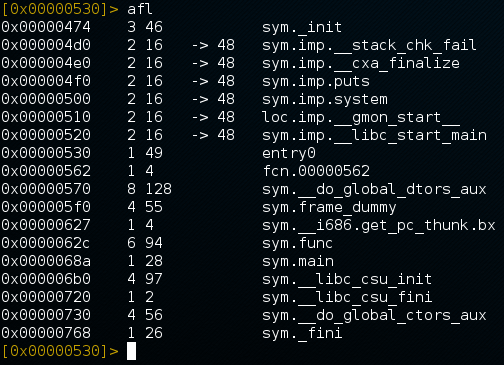
afl- 'analyse function llist', this will list useful functions in the program as well as their flag names and offset addresses. Like this:
-
s sym.main- set current address to the start of sym.main(), then you canpdfto disassemble it. -
pD [email protected]- disassemble and print the first 60 bytes start from the sym.shellcode's address. -
[email protected]- directly disassemble and print the first n bytes start from the sym.main's address, n means your current block size. -
b- display current block size.
0x02 Normal Usage and Order
Normally, when you got a binary going to be REed,
first take a glance at its file info and try to run it (if cannot run, try chmod).
Then open it with r2.
First use i to gether some overall info.
Then aaa to analyse it.
Then afl to look at how many functions are there in the program.
Then you can s sym.main, or just s main for short, to jump to the main funciton,
followed by pdf to see if how does it work.
If you find something interested, just use s to jump to it and pd or pD to print the disassembling result.